 We know that there are many Add-on’s available for Firefox to help us in web development, but when it comes to IE developer tools you will not see many of them.
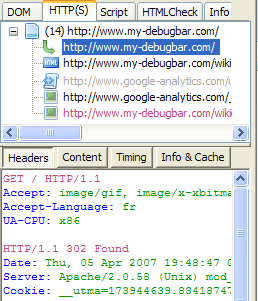
DebugBar is a plug-in for IE to help web developers and coders in development.
Features:
- DOM Inspector: View DOM Tree and modify tags attributes and css attributes on the fly to test your page
- HTTP Inspector: View HTTP/S request to check cookies, GET and POST parameters, view server info
- Javascript Inspector and Javascript Console: View javascript functions for easier debugging, see Javascript and AJAX code
- HTML Validator: Validate HTML code to correct and optimize your code and html size of your page
other features of this plugin include ablility to see page cookies, get pixel color on a page, make a page screenshot etc..
Debugbar is free for personal use, you need to buy a license for Professional use.
Download DebugBar


Great find Ram, I use Firebug for Firefox and this one will immensly help me in IE. Being a developer this is an absolute have for me.
Thanks for finding this.
@Keith
Glad that it is useful for you
Hi,
Thank you for your post about the DebugBar.
It is always a motivation to see people using it, so I know why I am working on new version.
Another tool I am working on is Companion.JS (http://www.my-debugbar.com/wiki/CompanionJS/HomePage) which plans to be a JS debugger for IE.
It is very early version so far. The verison 0.2 should be released soon with a “console.log” firebug-like feature.
I hope this will be useful for webmasters !
JFR
http://www.debugbar.com