Wassup is a wordpress plugin for real time visitor tracking, mind you this is not a plugin for blog stats. This plugin is useful if you want to see how your visitors are interacting with your blog.
How it works
Install the plugin like any other wordpress plugin. After installing the plugin go to your wordpress dashboard and select WassUp tab. You will see 4 sub tabs under this, SPY visitors, Current Visitors Online, Visitors Details, Options.
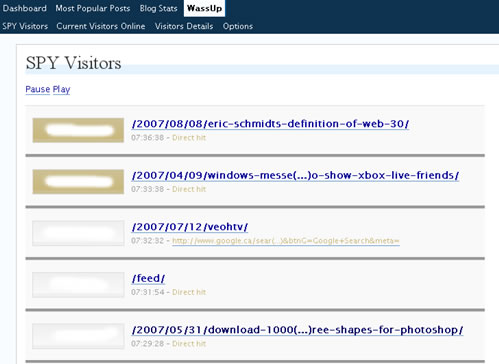
SPY Visitors: If you are a digg user and you know digg spy you don’t need any explanation for this, for the rest it shows the visitor activity on your blog in real time in a ajax way (auto loads the content). I am really impressed with this, if your blog gets lot of visitors at any given time you will enjoy watching it.
Current Visitors Online: It shows the number of visiotrs online at any given time
Visitors Details: You can monitor how your visitors are discovering your site, it shows the IP address, geolocation, referral site, hostname, date.
Options: It uses lot of database to store the data, you can set to delete this information automatically after a specified period of time like 1 day, 1 week, 1 month or 1 year. If you have limited database space make sure you delete the data quite often.
Download the WassUp plugin


This is pretty useful plugin, but is it acccurate like other established tracking?
@Nirmal
Yep it works well
Sounds like a cool plugin, quite similar to live plugin which does not store in database except last 10 visits.
Well I was guessing that. It makes entry for every single hit. Its a combination of Live plugin and Sute stats plugin.
Even live plugin consume resource when u get hit badly
I use pMetrics by Performancing for my stats and it comes with a real time “spy” feature too – it does not bog down your system resources either.
@Thilak
So far i have not experienced any site slowness because of this, but it may cause problems as Ashish said because it tracks each and every hit.
@Ram: Its not about just hits. It does 2 steps. Track and Store…and it repeats on the same server. Now consider other scripts like 103bees. They track but store somewhere else. 103 Bees is live, You can actually count live hits.
One more thing now when you see the screen of live hits you are opening up another connection so its 4 ways.
Tracks , Stores, Retrive and Display
That should make it heavy.
Even the live plugin goes heavy on the browser itself when you get loads of hits
@Char: Is it really live ? what else it does ?
@Ashish
yes i agree with you, it may become heavy when you have lot of hits.
@Char
Thanks for the heads up, i never used pMetrics, i will give it a try
The “spy” feature in pMetrics is really live – it is wild to watch. pMetrics is the most powerful stats package I have used to date. I did a write up of it at my site – pMetrics the best stats package for bloggers – it should give you a pretty good feel for its power.