Technology Bites

  • Home
  • Tech
    • Software
    • Browsers
    • Google
    • Internet
    • Windows
  • Mobile
    • Android
    • Apple
    • Windows Phone
  • Products
    • Phones
    • Tablets
  • TIP US
You are here: Home / Browsers / Check your web designs in multiple versions of IE

Check your web designs in multiple versions of IE

It is a pain to check your web design in all the versions of IE in your computer as your PC won’t allow you to install multiple versions of IE. Most of the time designs will break in lower versions of IE, that it is a whole different story. IEtester is a free tool that allows you to test web sites in different versions of IE including IE8 beta 1, IE7, IE6 and IE5.5.
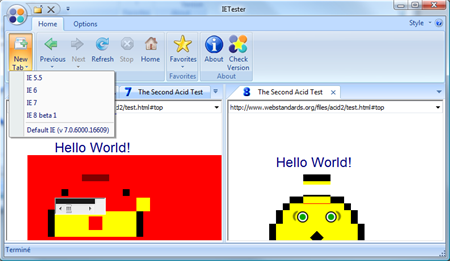
IETester

Another way to test is using browsershots, but sometime you end up in queue for long. via Ajaxian

See the video of IETester:


ScreenCast IETester from WebInventif.fr on Vimeo.

Share this:

  • Tweet

Related

About Ram

I am a blogger and Technology Enthusiast. I write about software, tech news, gadgets. You can reach me at ram@teknobites.com, follow me on Google+ or on Twitter

« Turn images to icons with Bradicon
Technology Talk 31/5/2008 »

Comments

  1. jsanderz says

    Ram,
    This is a really handy plugin, and it works well.
    Another handy plugin that lets you view websites in different screen resolutions is
    Windows Resizer
    :).
    Regards.

  2. silki says

    I like Browsershot.
    Its excellent, but sometimes slow.

Top Posts

  • Fake Windows 8 - A Must Have Android App for Windows 8 Lovers
  • MacBook Air hacked in 2 minutes
  • Google Chrome is out of beta (Updated)
  • Samsung announces smartphone GamePad and Mobile Console App
  • Google Chrome for Mac and Linux
  • Flame Malware spreads through fake Windows updates
  • CyanX Lock - A New Customizable Lockscreen Replacement for Android
  • Fotor: Photo Editing app for Windows, Android, iOS and Windows Phone
  • Yahoo Buzz Will Open to Small Publishers Soon?
  • Send RSS feed updates to Twitter via Feedburner

About Us · Archive · Disclaimer & Privacy Policy · TIP US · Copyright © 2026 · Technology Bites