Adobe AIR is a great platform for accessing Web Apps from your desktop, there are some great Adobe AIR applications are out there and the list is growing. Google web apps are so popular that everyone uses at least some of them, the list includes Gmail, Google Docs, Google Reader, Google Calendar, Google Maps etc, but there is no way to access these apps from your desktop so far.
GMDesk is a Adobe AIR application that allows you to access Google Suite of applications from your desktop. It supports Gmail, Google Docs, Google Calendar, Google Reader, Picasa and Google Maps.
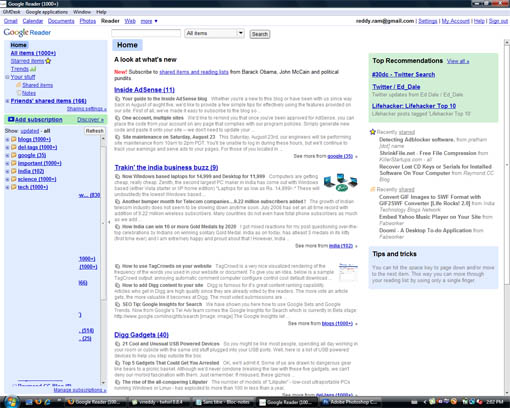
Install the application, and select the Google app you want to use and login with Google account. Once you are in you can conveniently change between apps using Google Applications menu or using shortcuts. If you use the same login for all the Google web apps you can switch between applications seamlessly.
GMDesk also supports Google Apps domains, if you are using Google Apps for domains you can use them with this app.
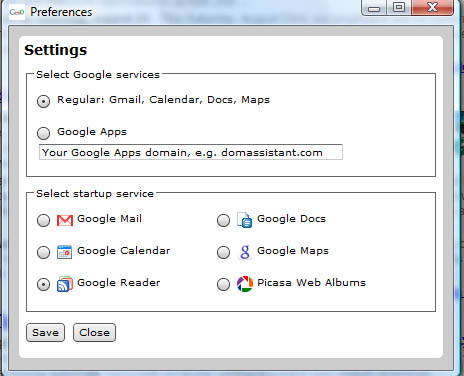
GMDesk surprisingly supports other services as well, suppose you want to do a Blog search or web search you can do that using this app, no need to open web browser. You can open all Google services using this app including YouTube and Google Video.
This is one of the best application for accessing all Google web apps from your desktop. Via Cybernet


One question. GMDesk is really cool. The only problem is how can I change the font size. The fonts are too small. Is there anything like Firefox add-ins can change the font size, remove ads and remove click tracking?
Thank you very much!
Google Web Apps are really cool. Its awesome to see that they have now got a tool to put it onto the desktop and its small and its free, digg it.