Google Chrome is available for only Windows XP and Vista, but if you are stuck with Windows 2000 and want to try Google Chrome, use this trick (Thanks to Pratham)
You need to change the user-agent of the browser to download Google Chrome to Win 2K. On Firefox, go to about:config, create a new string entry general.useragent.override and set it to this Mozilla/5.0 (Windows; U; Windows NT 6.0; ru; rv:1.9.0.1) Gecko/2008070208 Firefox/3.0.1
(Note: For Windows 2000 systems the unseragent string will have Windows NT 5.0)
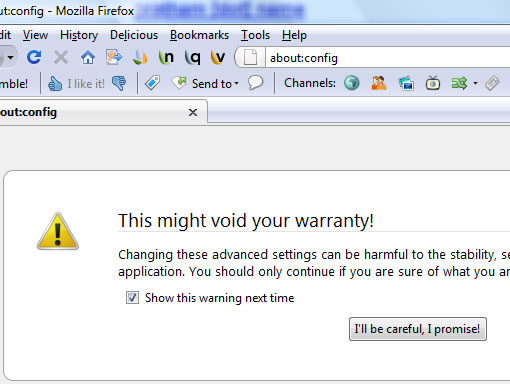
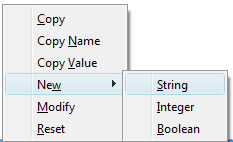
Right click to select new string

Enter String Name, and then enter above given value
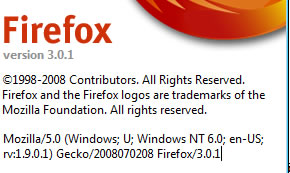
Check your Mozilla User Agent string from Help menu of Firefox, select About Mozilla Firefox.
Note: I haven’t tested myself on Win 2K system, but it seems to work with Windows 2000 SP4.
Update: With this method you can download Chrome but not working it seems (see the comments), mean while you can try portable chrome version.


Or use my portable Chrome multilanguage:
http://stadt-bremerhaven.de/2008/09/03/portable-chrome-021510/
Downloadlink at the bottom of my entry.
Have Fun 😉
http://www.google.com/chrome/eula.html
Doesn’t work. It downloads fine, but the setup file you get won’t run on 2K.
@Ozh
Thanks for the information, how about using the portable version.
I’ve been ferreting about looking for a solution to installing Google Chrome on a w2k machine and I came across this fellow…
http://blog.livedoor.jp/blackwingcat/archives/139405.html
You’ll have to translate his blog from Japanese but it’s easy enough to read after translation.
Does it work? I don’t know as I’ve only just found it and I gotta get off to work now so it’ll have to wait until I get home unless you’d like to try it out!
I thought there should be a way! Especially when games like Quake Wars and programs like Microsofts own windows Defender can be made to work on win2k very easily indeed in less than a minute and your average Internet Explorer (the most stupid kind of pc user) could manage it.
I can’t make sense of that site even with babelfish website translator (everything keeps saying “the Soviet Union”?! But if you make any progress could you create some kind of English instruction for the rest of us?
Cheers
One should download chrome2k.zip from that japaneese blog and run chrome2k.bat.
Script makes some changes to registry, turns some apps to compatabilty mode (?), runs IE to download Chrome.
So it does not work on my system yet, some problem appers while adding information to registry.
It adds fine to registry for me but then during installation it keeps come up with a box saying “Google chrome does not support Windows 2000 some features may not work”, just keep clicking ok every time it comes up and it will install fine.
Open it and it comes up with a box saying the same thing…
Click OK and then Chrome loads and appears to work fine!
What problem do you have adding to the registry?
I get a message that not all data added to registry becouse some sections are busying by system or other program.
try adding it to registry in safe mode or something.
I thought about safe mode or something like that. While my pc worked for week or nore, I didn’t want to restart it 🙂
But yesterday my HDD seems to be crashed. So I’m taking a break with Chrome until I buy a new HDD.
And I’ll try Navjot Singh’s method to install Crome on win2k.
I have listed an easier method for Windows 2000. Check here:
It shouldn’t break my computer, yeah!
My problem dosn’t relate to registry, it is a hardware fault.
It shouldn’t break your computer, I have done lots of registry tweaking on my win2k pc mostly from this site
As long as you don’t do something stupid and try to invent your own tweak nothing should really screw up your pc in the registry (though my dad does that sort of stuff all the time but hes an expert)
Hi, Stac.
> So it does not work on my system yet, some problem appers while adding information to registry.
Please install chrome2k.reg with manually.
Does the chrome download link appear,
when you run C:\Program Files\IEXP.exe(, whicke was made by this bachfile) and access to http://www.google.com/chrome. ?
Hi Navjot Singh.
I don’t want to know how to work but why wouldn’t work 😉
I’ll supplement at my blog a few points.
Thx.
Blackwingcat – Use my trick. It works.
Ive already downloaded the portable version of chrome.. Now the problem is when i run chromloader.exe, it gives me the for xp and vista only.. Now i downloaded chrom2k.zip as instructed but i cannot install the .reg key due to the IT lockdown on our company..
Question is, do any of you guys know how to convert the .reg file to .vbs file so that i could the place the registry keys to the registry? i cannot directly add the .reg file but if i add the registry keys via vbscript i think it would work (have found .vbs files modifying registry keys on my company dekstop)..
Navjot Singh, if you could provide me with a vbscript that would directly place the values in the .reg file to registry that would be a great help. Thanks..
Can you open regedit and work from there?
http://mysoogal.gotdns.org/?p=1519
installed google chrome in win2k 🙂
nope, cant open regedit from here.. basically i cant add registry entries via .reg files.. i have to add it via .vbs files because its the only way to add registry entries from my work computer..
please, does anyone know?
btw, i installed CHROME on my ceedo drive, it runs but can’t display pages.. does anyone know how to get it to run through proxy servers?
I guess there might be more chrome fans with windows 2000 if the windows 2000 owners could try it. I personally think that I would rather go with Linux than Vista or XP. Playing around with special HW could prove to be costly with later-than-win2k windows systems, because there is bound to be quite a number of reinstallations.
Worked fine for me using ‘crm2k016.zip’ from the Japanese page.
Had to restart before Chrome would run with out crashing on start up.
Screw Google Chrome : I’m staying on Win2K ; it is the last great OS without NSA spyware.
Screw that I have moved on to Fedora linux.
Much nicer and faster on my pc than windows 2000.
http://www.mediafire.com/?sharekey=35d9517942d36dc636df4e8dca141969dc2681caf5cca6d85621d66e282a0ee8
you can use this method. it works 4 me. i only have WIN2K SP2 and it works fine.
i looooves me the chrome. =D
why wont crome work on win 2000 my ie will never workn i have a viris and no windows disk and by the way chrom Sukkkkks!!!!!!!!!!!!!!!!!!!!!!!!!!!!!!!!!!!!!!!!!!!!!!!!!!!!!!!!!!!!!!!!!!!!!!!!!!!!!!!!!!!!!!!!!!!!!!!!!!!!!!!!!!!!!!!!!!!!!!!!!!!!!!!!!!!!! thats just my apiniuan
If Google wants to snub and give the bird to W2K users FINE! I’m sure there are other browsers that aren’t too good for 2000.
Version 0.2.149.30 installed and working fine, but how do you get rid of the warning message each time you start this browser??
I’ve just downgraded from XP Home to Win2K SP4 because I wanted more performance out of my old P4.
I’ve tried this method and it only works till when it starts downloading, then it fails there.
Now I am using Firefox, it’s blazingly faster that I don’t think I need Chrome for the moment or even IE8.
I’m not “stuck” with wy2k, but prefer to use it. F*** Microsquish. I’m not spending a penny more on their sh**ty products.
I’ve tried Google Chrome four times and am ready to remove it again. It crashes and simply isn’t stable enough for me. I’ll stick with Avant and IE8.