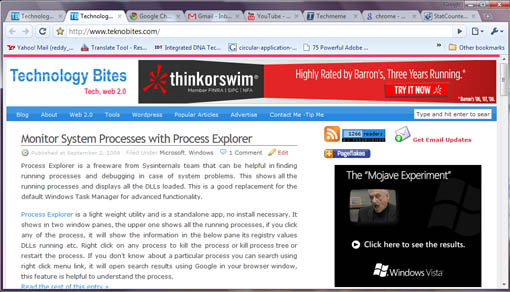
Google Chrome released today for Windows XP and Vista, since this is the first release i was not expecting much from the browser, but Google Chrome is awesome. It is fast, looks good and renders web pages perfectly, and all the web pages i visited rendered normally with out any quirks. What else you want from a browser.
Download Google Chrome from here if you haven’t already done so. While installing Google Chrome it will ask if you want to import bookmarks, passwords and other settings from Mozilla Firefox, do that if you wish and wait for it to finish the installation.
After installation fir up Chrome, first thing you will notice is that the tabs are arranged on top of the browser, this way it is much better i feel.
You can access options by clicking the tools icon from the top right corner of the browser. Here you will find the browser settings.
Home Page Settings
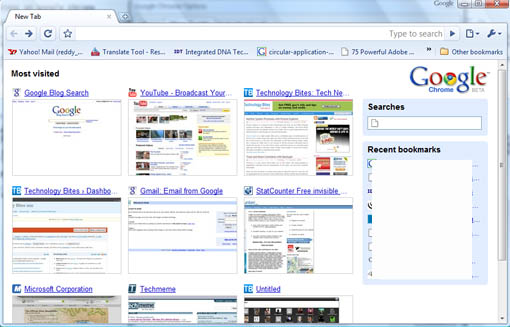
You can leave the home page as it is, in this case you will see your most visited pages as thumbnails (something like Opera Speed dial feature), and in the right side you will see a search box to search your history and shows recently bookmarked pages.
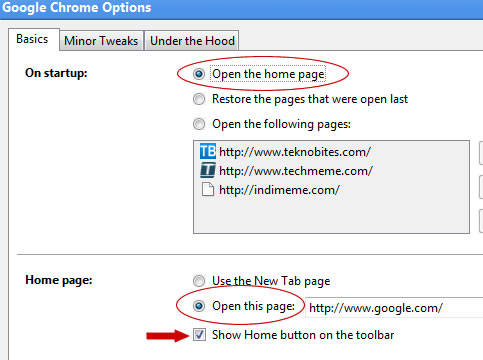
Go to options by clicking the tools icon on the right corner of the browser, in Basic tab you can set your home page.
If you select “Open the home page option, you can set the home page to your favorite site URL in the “Home Page” section.
If you want to open more than one page on startup select the “Open the following pages” option, and then click “Add” button, you will see all the URLs you opened here, select from the list or just enter the URL and click “Add”. Next time onwards when you open Chrome it will load all those pages.
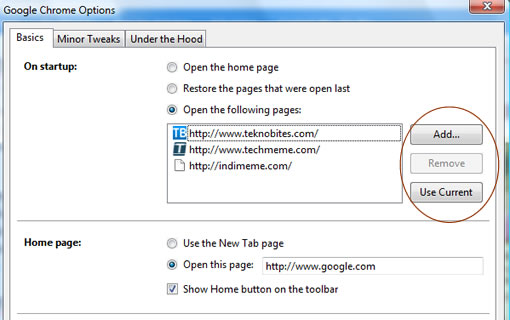
You can also use the option “Restore the pages that were open last” to open last closed tabs.
If you want to see the home button in the browser bar, you can click the option “Show home button on the toolbar”
From “Under the hood tab” in options you can set security options like malware protection, and set preferences for Google Gears, network settings etc.
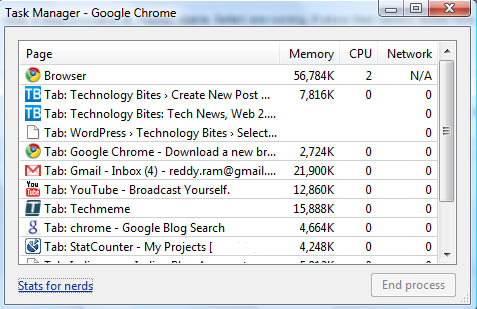
One interesting feature of Google Chrome is the Task Manger, you can access this from developer menu by clicking the top right “page” icon. Task manager shows all the instances of the Google chrome browser, that is for each tab it shows a record with memory, CPU usage and Network. This is quite helpful if you want to see the applications that are eating most of your memory and to kill them. There is also a link in the task manager that reads “Stats for nerds”, if you click that link it shows detailed stats of the memory it is using. Note, if you have other browsers opened it will show those stats also here.
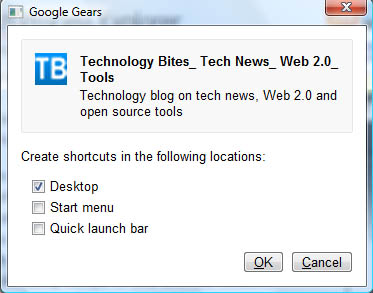
It allows you to create shortcuts for web applications using Gears, Gears got this feature in June
Privacy Mode aka incognito mode
 Incognito mode is the privacy mode of the Google Chrome, web pages you visit in this mode won’t appear in your browser history or search history, and other traces like cookies will be deleted when you close the incognito window. On the other hand if you download anything and save pages as bookmarks those will be preserved.
You can recognize the incognito window using the incognito icon, it will be displayed on the left hand corner of the browser.
Be aware that incognito mode doesn’t store any information on your system, but it is not an anonymous browsing tool, check here for more information.
Overall Google Chrome looks awesome with some interesting and useful features. The browser is amazingly fast and never crashed, Mozilla Firefox 3 on the other hand crashes regularly. I will use Google Chrome for next couple of days and see, if it works this way i will shift from Firefox to Google Chrome. Only one thing that holds from using it regularly is missing add-ons that are in Firefox. Since this is an open source browser we may see most of the popular add-ons of Firefox will gen updated for Google Chrome. There is one important caveat in this browser, that is it is using lot of memory of you open number of tabs. Of course you can pin point which ones are eating most of the memory but still it uses lot of memory, i think in the next versions this will be improved.
Have you tried it, if not download it from here, it is worth trying. If you have alreday tried what do you think of it?.
Post Updated


No Stumbleupon yet, nice browser but boringly sparse
Are you paid by google?
i have also checked out chrome. I was very unimpressed. I don’t like the way it opens each tab as a new task in windows. I have also seen it on both Intel and AMD systems. On AMD it locks up constantly, that is probably an issue with the coding.
It is still a beta and hopefully issues like this will be removed once it goes gold.
Would it not be better to be honest in your review? So that it can be made a better product?
I attempted to use it, but it does nothing but fail out with an error.
“The application failed to initialize properly (0xc00000005). Click ok to terminate the application”
Vista (32) w/SP1, also have Firefox 3 and IExplore 8 Beta installed. No love from Google Chrome.
I tried it for a couple of hours and found it to be nowhere near as good as Opera or Firefox.
All in all I like Google Chrome, but I’m too accustomed to many of my Firefox features. Switching over would be hard.
I feel like an ass saying this, but… I don’t think I’ll get it unless it supports stumble upon. haha
I love the speed and the simplicity. It’s like a turbo charged browser and it’s very user friendly. If it could have the same add-ons as firefox 3, then I’m totally sold.
@Mud Trout
No extensions yet, it would be nice of we get add-ons for stumbleupon, delicious and few others.
@Wha?
No, what makes you think that i am aid by google
I didn’t test it on AMD, i tested on Intel, it works perfect for me. In the next release hopefully these issues will be resolved.
@Paul, @Goran
Until it gets add-ons i think its hard to leave Firefox, but overall its a good browser.
Chrome is a very good browser. Considering it is a few days old and it is running more stable on my laptop than IE or Firefox. No errors, everything rendered perfect. New features will surely be developed soon. GOOGLE have some of the best dev’s in the world and their products are superior in many ways. On the memory issue: CHROME uses less memory than the other browsers with multiple windows open and is definitely allot faster! The question is not if Chrome is good or not. The question is: When will it be brilliant and be supported by all/most systems. I love it and would be thoroughly proud if this was a product with my name on!
Just tried it out now. It seems very slick indeed. Just one thing, where’s the Homepage button? I’m not too keen on the whole separate process for each tab either. If there’s going to be more support for it and I assume there will be seeing as it’s open-source (smart move) I can genuinely see this becoming my new browser.
Ooh, I’l have to backtrack on the less memory part. It does use allot! Most of our systems should be fine but it is time that dev’s start writing more “compact” code. There is far too many programs that use vast amounts of memory unnecessarily. Still a good browser. Remember it is Beta so things are only gonna get better from here. I still prefer it above my other browsers.
@Apocrypha:
You can show the “Home” button under “Option”.
Come on! Try it and read carefully!
I love it too!
@Apocrypha:
I updated the post with details on how to set home page.
Cheers. Admittedly it was quite simple of me to miss that check box, feeling a tad embarrassed now. Oh well.
must be on google’s payroll. I tried it thinking it would be great, but i to was not impressed. maybe im just use to firefox but i felt like i couldn’t navigate in chrome. the options were weak and tool bars were nowhere to be found. when the time came to switching from IE explorer to firefox i had no problem in adapting instantly. google needs to try again.
The damn thing crapped out while trying to buy friends using the FFS application on Facebook. Any Ideas?
I never had FF3 crash on my and I got it in beta.
I have tried Google Chrome browser and it is sleek, quick and simple. For me it’s a fight for alternatebackup browser between it and Opera. Firefox is still my preferred browser because of it’s customization and add-ons. Yes I know adds make it slower and blotted, but they also give me control and exactly what I want. Chrome would be perfect for my bootup USB drive.
@ram
My comment is more of a tongue-in-cheek remark. Directed to the “It’s awesome”. As it seems like the review is more of a sales pitch.
Chrome is going to work with most web sites and work fast.
While Chrome is new, I am currently typing this running 0.2.149.27, it is a re-branded browser.
It is built on Webkit (safari).
That would also go to my point about it not working well with AMD.
I think that chrome is good for a beta, but it is nothing new and outstanding. Only thing it has is the google brand name. A name that will probably count for more than the product itself.
oh.. i also forgot to mention.
i agree with the post about it using a lot of ram.
i found that it ran on most systems using over 100mb more than FF3. Going to the same sites and having the same amount of tabs open.
Chrome is very promising, can’t wait until it supports adblock and stumbleupon, among other plugins, so that I can use it.
Heard of how much tracking google will do when you use their program? They are going to track your ass down like big brother does to society right now to every site you go to..blogs you type in, etc. I would hold off until that stuff gets figured out and justified before anyone tries using this. and yeah this blogger looks kinda fake
I have yet to try it. Looks good.
i have AMD and it keeps freazing with me to, im sure that they will fix this as well. but add ons, i would think, would have been there bread and butter. ” only the best from google “
so obviously you never read the privacy agreement. good luck there numb-nut
I have tried it at home and at work…it work well ..home i have an AMD and it work fine unless i want to separate one tab….it eats a lot of memory…and another problem…if the main Chrome (the one using 40 Mb) crashes or is closed from task manager all other close…but no problem 🙂 if another chrome task crashes you remain with the others 😉 … it’s fast and simple…if it had stumble upon plugin i would switch 😀 … with time the bugs and problems will be fixed…but for the 0.2 version it rules…and it’s better than other when it comes to loading time and javascript…good step google
I have high expectations from Google. They’re a sweet company with a lot of power and money. This browser is pretty standard. However, that doesn’t mean its bad. Half the time I get all these extensions for FF and they just become a burden or I never use them. Extension options would be nice. I heard that it is open-source, so I am sure extensions are sure to come. Overall, i’m satisfied.
I haven’t seen any options for extensions, but I think they’ll add some in the future. Without them the browser looks poor
I could fall in love with it but I don’t want to give up my Firefox Extensions. I especially don’t want to give up FoxMarks. Hopefully as Chrome becomes more popular extensions/addons for it are developed that do the same things I get from Firefox. I just need bookmark synchronization.
I LOVE GOOGLE CHROME!!! This is honestly the best browser experience I have ever had.
like the browser from google and have already switched myself from IE and firefox.
No addons. That’s a deal killer for me. No ReadItLater, no DownThemAll, no Pterodactl, no AdBlockPlus, no NoScript. So no Chrome for me, thanks. Also, they need to fix the bug that causes typing in the omnibox to be slow and unresponsive if you have a lot of bookmarks. I’ll use it. Some day.
Horrible, horrible, horrible. One of my worst software installs. IMHO, avoid this piece of junk like the plague.
You though MS took over. This thing immediately decided to associate itself with multiple files types, decided for me I wanted to use it’s mail and news facilities (and why would I, they’re awful!). So I uninstalled. Did it even do that cleanly? Not on your life! After the uninstall I couldn’t click any links in any MS product without getting a “you don’t have permission” error. Skyped links opened in Word. Had to get into Registry to fix it.
What a piece of JUNK!!!!!!!!!!!!!!