Some of the Firefox’s popularity can be attributed to the number of add-ons available to pimp the browser. Google Chrome doesn’t have a stable extensions capability yet but it is possible to install extensions, only thing is you need to run developer builds of Google Chrome browser. Developers are building extensions to the Google Chrome browser, although there are only handful of extensions at this time, if the extension support is well built into the Google Chrome browser then I am sure we will see valuable extensions to the platform.
How to install extensions in Google Chrome
You need to download Google Chrome Developer build for the extensions to work.
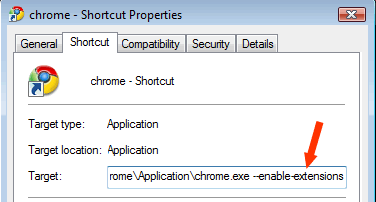
After installing the developer build right click the Chrome shortcut and click properties. After chrome.exe add this –enable-extensions
chrome.exe –enable-extensions
Now go to the extensions page and download the extensions and install them.
How to uninstall extensions in Google Chrome
For any reason if you don’t like or don’t use the extensions you can uninstall them easily.
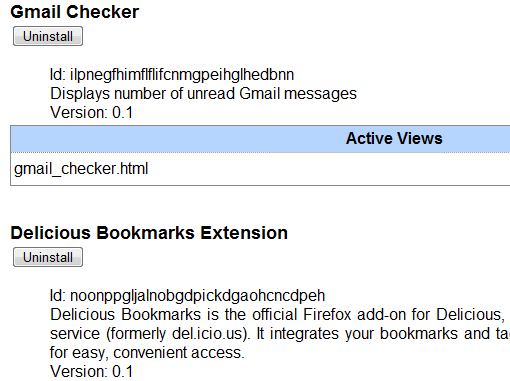
Enter chrome://extensions to the address bar you will see the list of installed extensions with uninstall buttons. Click on the uninstall button to uninstall any extension with ease.
Delicious Chrome Extension
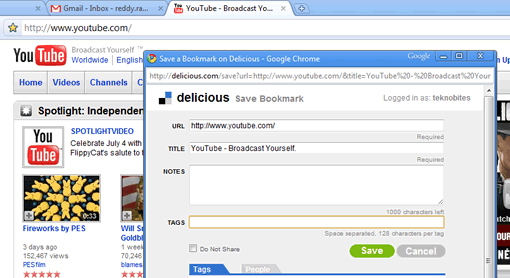
Firefox delicious extension is one of the popular and quite useful extension. Now the Delicious team has released the extension for Google Chrome, the extension is a light version which allows you to post bookmarks from Google Chrome to Delicious. It adds a bookmarks button to chrome omni-bar (address bar). Using the button you can bookmark stuff to delicious, you can also use Ctrl+D keyboard shortcut to bookmark. Download Delicious Chome Extension
Download Google Chrome Dev Builds Check out sample extensions.


[…] Flickr is a Google Chrome extension that is designed to enhance the user experience of Flickr using Google Chrome browser. Recently […]