Technology Bites

  • Home
  • Tech
    • Software
    • Browsers
    • Google
    • Internet
    • Windows
  • Mobile
    • Android
    • Apple
    • Windows Phone
  • Products
    • Phones
    • Tablets
  • TIP US
You are here: Home / Google / Gmail Goggles: Stop drunk emailing

Gmail Goggles: Stop drunk emailing

Gmail Labs has introduced a new feature today that helps you to not to send emails when you are drunk or tired. The feature is called Goggles which is active on weekend late nights by default.
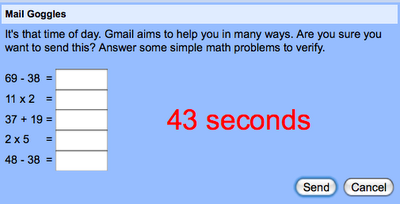
Gmail Goggles

Gmail Goggles can activated from Gmail -> Settings -> Labs. Once activated it shows a random math questions when you try to send a mail in weekend late nights. You can change the time and day for the Goggles activation from Settings -> General Tab.

I may not use it much myself but it is definitely useful for people and is fun.

Gmail Goggles

Share this:

  • Tweet

Related

About Ram

I am a blogger and Technology Enthusiast. I write about software, tech news, gadgets. You can reach me at ram@teknobites.com, follow me on Google+ or on Twitter

« Spellist: Check spelling mistakes on your site
Geode: Your browser knows where you are »

Comments

  1. Артём Курапов says

    I’m sure that everyone is able to solve it using Start-> run -> “calc”

Top Posts

  • Updated YouTube iOS App Adds Support for Live Streaming
  • Browser to Browser phone calls
  • Lenovo Smart Band HW01 with OLED display launched at Rs 1999
  • Turn images to icons with Bradicon
  • 20 Open Source Windows Apps For You
  • Lively: Virtual World from Google
  • Doodle 4 Google Contest for School Children in India
  • Lenovo 5-inch tablet images leaked
  • Windows Phone 8: Everything you need to know
  • Top Quad Core Android Phones Below Rs. 15000 in India

About Us · Archive · Disclaimer & Privacy Policy · TIP US · Copyright © 2026 · Technology Bites