Vistalizator is a useful tool for people like me to get additional language packs for Windows Vista Home, or Windows Vista Home Premium. I puchased a new laptop here in France with Windows Vista Premium installed, everything is good except i got a French windows vista. Microsoft won’t provide Multilingual User Interface (MUI) for Home and Home Premium versions, instead they provide language interface packs (LIP) which is of no use for me.
Vistalizator is a freeware that allows you to install these multilingual user interface in Windows Vista Home or Windows Vista Home Premium. Using this tool is easy and with in few minutes you will get your language of choice installed on your computer. It uses official Vista language packs, so you will get all the Microsoft goodness.
To get started download Vistalizator, it is a standalone app, just unzip it and run it. You have to download a MUI pack of your choice before going ahead, these MUIs vary in size depending on the language of your choice. After downloading the MUI open vistalizator and click Add Language. It will take few minutes to finish this step, then click Install to install the language of your choice and accept the language change. Now restart the system, that’s it you have a new language now in your windows vista. You can use vistalizator to install more languages and change between them.
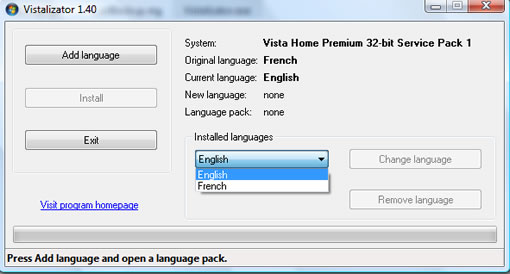
Features
- Change Vista display language in less than 5 minutes!
- Uses official Microsoft Vista language packs
- You can install all 35 languages and switch between them easily
- Works in 32-bit and 64-bit Vista
- Compatible with Vista Service Pack 1
- User Account Control (UAC) compliant – prompts for administrative privileges
- Safe use – no file is overwritten/changed during language installation
(except for language upgrade after installing Vista SP1) - Vista Speech Recognition works with all supported languages:
Chinese, English, French, German, Japanese and Spanish
(go to Control Panel -> Ease of Access -> Speech Recognition Options)
Issues
Windows update may not work for you after installing a new language, the workaround for this is to run vistalizator and revert to the original vista language, then run windows update and then revert back to your language choice. This may be a little bit annoying, since windows update is usually once it shouldn’t be a problem.
I used this app to install English on my French Windows Vista system and it worked flawlessly.


need help with new up-dates from windows to beta 8. i have a windows vista home premium 32 bit computer; HP Pavilion a1726x desktop 320GB. help please raysylvon@gmail.com….thanks
Yes. It works properly. I have Vista Home w hebrew interface. After 5-10 min of simple installation I’ve got complete English Vista w hebrew support, as I need.
I really appreciate your effort to the people around the Globe. I use your software the way you have directted and it work. I’m very very happy, i dont even know what to say but i pray that God will always give you more wisdom and bless you in a million. I will do my best to introduce more people to web…Thanks
Hi my name is LIAD and i want to change my windows xp to windows vista. Thank you very much.
Iiad, you’re simply an idiot 🙁
can u help me ..
how can i get the hebrew languege for windows vista home premium 32 bit sp2
i need your help ..
rana
Avira antivirus warns that Vistalizator download has a virus
hello, i went all steps but i reached some where to add language how to add english .To down load is not possible because of vista home premium
@Respig
If you want to download English MUI pack use this direct link
Great man! i successful install english and its work. thanks god bless you for tutorial
help!in home premium d’ont work sp1(mui)