Technology Bites

  • Home
  • Tech
    • Software
    • Browsers
    • Google
    • Internet
    • Windows
  • Mobile
    • Android
    • Apple
    • Windows Phone
  • Products
    • Phones
    • Tablets
  • TIP US
You are here: Home / Tech News / Create animations in your browser with DoInk

Create animations in your browser with DoInk

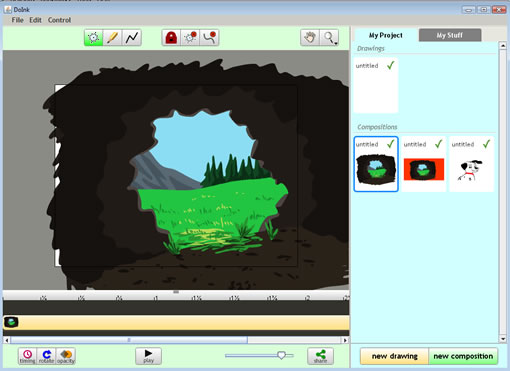
DoInk is a fun service that allows you to create animations in your browser. The app runs in Java and feels like working on a desktop app. DoInk has a large collection of animated clips, backgrounds which you can use to create animations or drawings.
doink

Creating animations is fun and easy, you can draw the characters if you want or use community stuff and use them in your custom animations. You can clone the frames from the bottom of the editor. You can tweak the animation of clips using path editing tools.

You can use the timeline to clone individual frames and tweak to them with minute modifications until you get a better animation. The created animations can be shared with others by embedding on social networks or sites. DoInk is a fun tool for creating animations online.

Related: Create Comic strips online with Comiqs and Toondoo

[Via Webware]

Share this:

  • Tweet

Related

About Ram

I am a blogger and Technology Enthusiast. I write about software, tech news, gadgets. You can reach me at ram@teknobites.com, follow me on Google+ or on Twitter

« Download Facebook Photo Albums
Google Similar Images Search »

Top Posts

  • Updated YouTube iOS App Adds Support for Live Streaming
  • Browser to Browser phone calls
  • Lenovo Smart Band HW01 with OLED display launched at Rs 1999
  • Turn images to icons with Bradicon
  • 20 Open Source Windows Apps For You
  • Lively: Virtual World from Google
  • Doodle 4 Google Contest for School Children in India
  • Lenovo 5-inch tablet images leaked
  • Windows Phone 8: Everything you need to know
  • Top Quad Core Android Phones Below Rs. 15000 in India

About Us · Archive · Disclaimer & Privacy Policy · TIP US · Copyright © 2026 · Technology Bites


Loading Comments...