Technology Bites

  • Home
  • Tech
    • Software
    • Browsers
    • Google
    • Internet
    • Windows
  • Mobile
    • Android
    • Apple
    • Windows Phone
  • Products
    • Phones
    • Tablets
  • TIP US
You are here: Home / Software / SuperCopier for copying files in windows

SuperCopier for copying files in windows

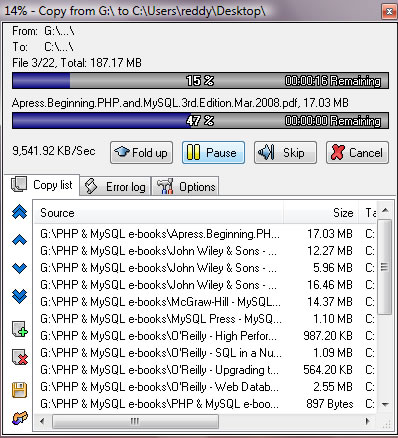
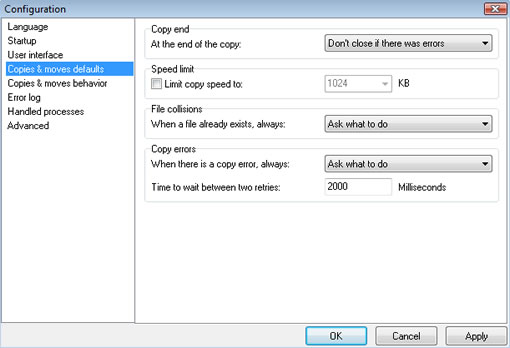
Supercopier is a freeware for windows that gives users more options while copying files in Windows. Teracopy is a similar app but that won’t give many options for users and some of you reported that it some time screws up the system. Supercopier gives an option to control the speed of the copying process, you can limit copy speed in configuration.
supercopier for windows

Supercopier is a tiny app with features like transfer resume, copy speed control, copy list editable while copying and allows you to save/load a list of files to copy. You can setup an errorlog file for debugging later. You can also setup options on what to do when it encounters errors or if the file already exists etc. [Download Supercopier]
supercopier

Thanks Smoki3 for the tip

Share this:

  • Tweet

Related

About Ram

I am a blogger and Technology Enthusiast. I write about software, tech news, gadgets. You can reach me at ram@teknobites.com, follow me on Google+ or on Twitter

« Internet Explorer Security Update Available
Winamp iPod Plugin »

Top Posts

  • Google Chrome for iPhone and iPad
  • Sony Walkman Player for Android Ice Cream Sandwich and Jelly Bean
  • Twittershare - File Sharing for Twitter
  • CloneSpy: Identify Duplicate Files
  • HTC Desire 310 with 4.5-inch display announced
  • Sony India teases Xperia Z launch on March 6th, available from 12th March, Pre-order now at Rs. 40,000
  • Synchronize Outlook Email, Calendar, Contacts With Gmail
  • Facebook mobile apps redesign makes photos 3 times larger
  • LG launches Optimus L7 II and L3 II phones in India
  • LG G2 press shots leaked ahead of the official announcement

About Us · Archive · Disclaimer & Privacy Policy · TIP US · Copyright © 2026 · Technology Bites


Loading Comments...