If you are looking for a free, customizable, light-weight application menu and launcher, check out Appetizer it is a free and open source application launcher. There are many application launchers available for Windows, Appetizer is one of the best in that class, it is open source, easy to use and is available as a portable app, that means you can run it from your USB drive.
When you the app for the first time you can import your quick launch menu shortcuts or start menu. If you are running the portable version from USB drive with standard portable apps structure then it will automatically detects the apps installed in the USB drive.
Appetizer is skinnable, supports plugins. You can resize the dock, and setup hotkeys to launch the app with keyboard shortcuts. Setup a multi launch functionality.
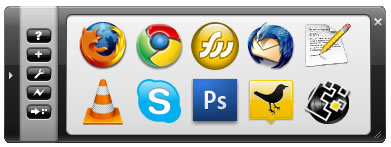
Features:
- Support for plugins
- Support for multiple skins (two included)
- Resizable dock, which allows displaying the icons both horizontally or vertically.
- Three sizes of icons: Small, large and extra-large
- Support for custom icons
- ‘Wizard’ to automatically imports shortcuts from various locations
- Organize the icons by drag & dropping them
- ‘Multi-launch’ functionality
- Regroup multiple shortcuts within one menu
- Hot key to hide / show the dock
- Special items to provide extra functionalities: hide / show the desktop, Recycle Bin, Control Panel, etc.
- Support for multiple languages
- Minimize to tray icon functionality
Appetizer is free and open source application launcher for Windows. Download Appetizer

