Technology Bites

  • Home
  • Tech
    • Software
    • Browsers
    • Google
    • Internet
    • Windows
  • Mobile
    • Android
    • Apple
    • Windows Phone
  • Products
    • Phones
    • Tablets
  • TIP US
You are here: Home / Software / Batch Download Flickr Photos with Flump

Batch Download Flickr Photos with Flump

Flump is a Adobe AIR application that lets you download Flickr photos of any Flickr user to your hard drive.

Using this app is straightforward, enter the flickr username or ID and specify the location in your hard drive to store photos and start flump. If you don’t know your Flickr ID you can get it here.
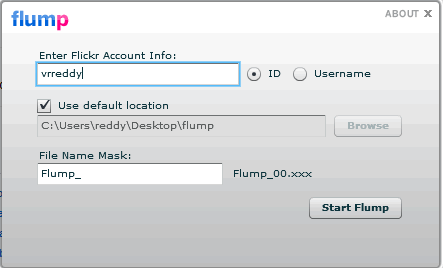
Flump Adobe Air App

Currently it can only download the original image source, that means for it to download images Flickr account owner has to set their account permissions to allow the original images to be downloaded.

Flump is simple to use than many other tools, its perfect to take a backup of your Flickr photos.

Share this:

  • Tweet

Related

About Ram

I am a blogger and Technology Enthusiast. I write about software, tech news, gadgets. You can reach me at ram@teknobites.com, follow me on Google+ or on Twitter

« IZArc: Free Archiving Tool
OperaTor: Portable Browser for Anonymous Browsing »

Top Posts

  • ThumbStrips Firefox Extension, Screenshot The Web While You Browse
  • Xolo A500S launched with 1.2Ghz Dual Core, Android 4.2, 4-inch display for Rs. 6999
  • Opera Max data compression app now enters open beta
  • Wordpress session save path error
  • 3 New Features from Gmail Labs
  • Install Additional Language Packs in Windows Vista Home or Home Premium
  • DSP Manager: The Best Equalizer app for Android
  • Google Earth Meets the Browser
  • Remember The Milk Adobe Air App
  • Polaris: Google Analytics Dektop App

About Us · Archive · Disclaimer & Privacy Policy · TIP US · Copyright © 2026 · Technology Bites