Technology Bites

  • Home
  • Tech
    • Software
    • Browsers
    • Google
    • Internet
    • Windows
  • Mobile
    • Android
    • Apple
    • Windows Phone
  • Products
    • Phones
    • Tablets
  • TIP US
You are here: Home / Software / Butler: Hot key menu and keyword launcher for Mac

Butler: Hot key menu and keyword launcher for Mac

Butler is a free productivity tool for Mac OSX to perform different tasks using shortcuts like hot keys, events, abbreviations.

It lets you manage these tasks with full customization. You can assign one or more shortcuts to a task.
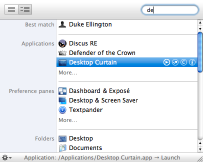
butler

Tasks it can perform

  • launch applications
  • open files
  • access preference panes
  • manage bookmarks
  • search the web
  • run AppleScripts
  • extend the pasteboard
  • enter text snippets
  • simulate keystrokes
  • control iTunes
  • accelerate Spotlight
  • move/copy files
  • and more

Note: Works with Mac OSX 10.4 or higher. Developers say that this version 4.1.5 is a Transient Release, it only works until July 1, 2008, meanwhile Butler 5 beta is released. [Via Cool OSX apps]

Related: Windows Keystroke Launcher

Share this:

  • Tweet

Related

About Ram

I am a blogger and Technology Enthusiast. I write about software, tech news, gadgets. You can reach me at ram@teknobites.com, follow me on Google+ or on Twitter

« Photo Albums in PowerPoint 2007
Wikia Search Launches »

Top Posts

  • Fake Windows 8 - A Must Have Android App for Windows 8 Lovers
  • MacBook Air hacked in 2 minutes
  • Google Chrome is out of beta (Updated)
  • Samsung announces smartphone GamePad and Mobile Console App
  • Google Chrome for Mac and Linux
  • Flame Malware spreads through fake Windows updates
  • CyanX Lock - A New Customizable Lockscreen Replacement for Android
  • Fotor: Photo Editing app for Windows, Android, iOS and Windows Phone
  • Yahoo Buzz Will Open to Small Publishers Soon?
  • Send RSS feed updates to Twitter via Feedburner

About Us · Archive · Disclaimer & Privacy Policy · TIP US · Copyright © 2026 · Technology Bites