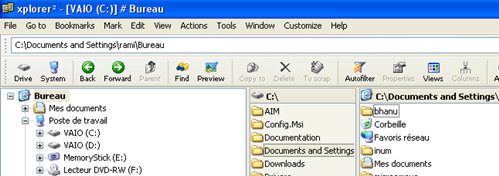
Xplorer2 lite is a good replacement for the default windows explorer. It is a dual-pane file manager with far more functionality than windows explorer.
Once you install and open the xplorer2 you will notice lot of options in toolbars, its hard to describe all the functions here, because i have yet to explore all the features myself. we will see some key features of this app here.
- Multi threaded & multi-window operation
- Folder tree panel
- Dual pane mode (browse 2 folders in one window)
- Tabbed interface
- Keyboard shortcuts and overall usability
- Mass renaming
- Change file dates
- Find text in files
- Folder comparison & synchronization
- Script wizard for DOS & win32 text commands
- Toolbar customization
- Folder junctions (NTFS)
- Calculate folder sizes in detailed view
Xplorer2 lite is free for personal and academic use, there is also a pro version with more functionality for $29.95.


Looks good to me, but is it fast like the Windows explorer and what abt memory consumption?
I will give this a try. Thanks
@Nirmal
Its a light weight app and doesn’t use much memory
@Alfred
ur welcome
This looks great. Will give it a try right away.
Another option is TabbyFile. I use it and quite pleased with the performance.
@Syahid
I haven’t tried TabbyFile, i will look at it