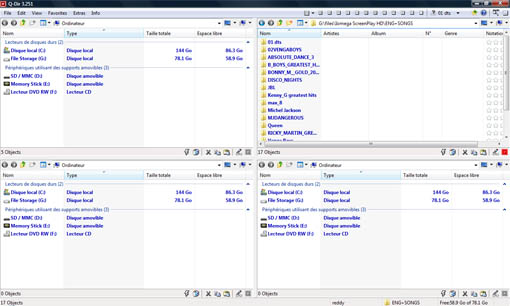
Q-Dir is a multi-pane windows explorer, a better alternative to default windows explorer. The most striking feature of this app is Quadro-View, a four pane explorer.
This is a light weight app (387KB), and you don’t have to install it to use. Extract the archive, then rename the file Q-Dir_Installer.exe to Q-Dir.exe. Now you can just open it and use it. This is a portable app, meaning you can run even from your USB stick.
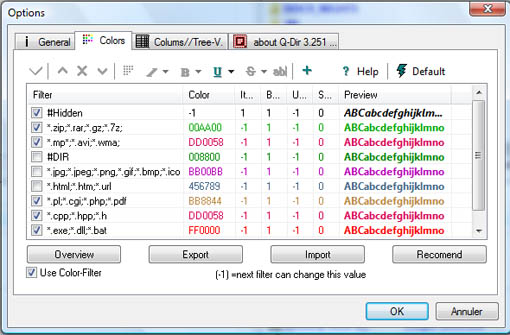
Another useful feature of this software is color coding, you can customize the color coding for different files so that you can recognize them quite easily based on colors.
Q-Dir Features
- Favorites: Quick access to most often used folders.
- Drag&Drop: Move files by dragging in Q-views, and other programs such as MS Explorer.
- Clipboard: Copy/ Paste between the Q-Dir directory views, and other programs such as MS Explorer.
- Folder-Type: ZIP-, FTP-,cabinet-,network-, system – folders, shortcuts …
- Views: Large icons, tiles, list, detail, thumbnail (Vista: extra large symbols) .
- Export: to XLS, CSV, TXT, HTML.
- Screen magnifier: anything on the screen can be enlarged.
- Color Filter: Different colors for different item types (e.g. *.log;*.txt).
- Highlight-Filter: Effective way for fast items highlighting.
- File-Filter: Allows for quick and easy filtering of the items.
- Columns: All columns support, and save function .
- Quick-Link’s: For fast folder access.
- Folder-Select: Fast & flexible folder selection address-bar/ desktop menu/ my-computer menu/
- Multi-INI: Several INI files for Q-Dir.
- Tree-View: Simple and quadruple.
- Preview: Allows a quick preview.
- Portable: from 2.77 is Q-Dir portable.
Download Q-Dir, Related: Xplorer2 Lite


looks good, promising features…downloading. 🙂
@abhishek
It works well also