Windows XP has some nice add-ons called powertoys, these are quite useful and increase your productivity. Out of these Image Resizer is the most useful, you don’t need to open Photoshop to just resize an image or a bunch of images, Image Resizer powertoy will do that for you in a mouse click. But this only work with Widnows XP, so some dude has created a clone of Image Resizer Powertoy that works with other Windows versions as well. It supports Windows Vista, XP, 2000, NT, 98 and 95.
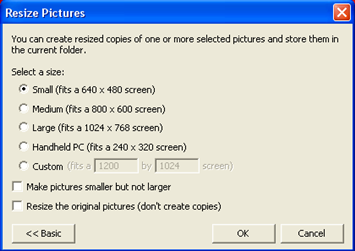
Once you install this app it will add a link to mouse righ click context menu. Right click on any image or a bunch of images to resize them. Download Powertoy Clone


Till now, I was using Photoshop or online resizers to resize images. Thanks to you, I’d now be able to do it easily from Windows itself.
Thanks for this, should stop my love-hate relationship with irfanview….
@Jacques, Haris
This is quite usful tool
I use Microsoft Office Picture manager for quick jobs and Photoshop for detailed ones. Nice find.
Great find. Another toy that I missed upgrading to Vista. Not anymore. Thanks.
Wonderful. Now I might just actually upgrade to Vista. This tool is very every bit as functional as the Microsoft Powertoy.
Only one minor problem, it doesn’t add a link in the right-click-menu in IE8beta, yet it does work in IE7. I am sure that once IE8 goes off beta, this problem will be resolved.
Excellent work, been waiting a long time for this.