If your start menu is loaded with lot of programs and every time you are like searching for the applications to launch give Jetstart a try. Jetstart is an quick application launcher and start menu replacement for windows. It allows you to quickly access categorized start menu shortcuts, recently launched programs and system commands.
Jetstart also supports searching for the programs, to find any program just open jetstart ans start typing few letters, it will display the programs as you type. You can click the search results to quickly launch any program.
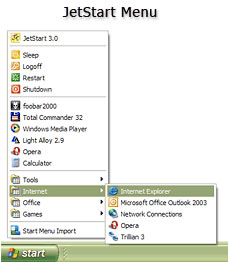 Jetstart toolbar allows you to quickly launch your favorite applications. You organize the shortcuts with drag and drop, launch multiple programs at once. Activated by hot-key or from the tray icon.
Jetstart comes in two flavors a free version and a pro version for $14.95. With the pro version you can add your own categories, hot keys manager and support. But free version is good enough for any one.
Related: Launchy: Keystroke Launcher For Windows


If categories came as a free option, then its worth trying.
I have used Jetstart earlier but have now settled with using Launchy and Rocketdock since its more faster.
@Nirmal
Yaah that would have been good
@Keith
Yaah launchy is good, never tried rocket dock