Technology Bites

  • Home
  • Tech
    • Software
    • Browsers
    • Google
    • Internet
    • Windows
  • Mobile
    • Android
    • Apple
    • Windows Phone
  • Products
    • Phones
    • Tablets
  • TIP US
You are here: Home / Tech News / Microsoft Photosynth Goes Public

Microsoft Photosynth Goes Public

Photosynth

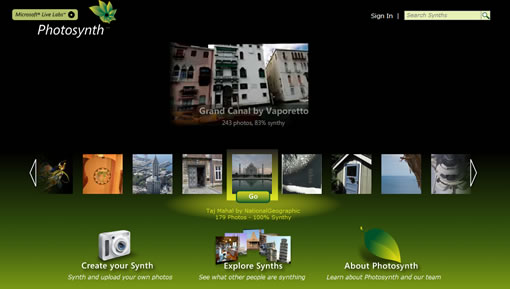
Microsoft Live Labs product Photosynth goes public, the technology previewed in 2006. For those of you who don’t know what it is, Photosynth allows to transform digital photographs to 3D models, called as ‘Synths’. With the public release now users can convert their digital photos to synths in their browsers.

Check some awesome synths from the collection on photosynth website. Photosynth site is not active right now, showing a message that Photosynth site is overwhelmed, but if you are lucky you can see some nice synths randomly, refresh the page to see a different one.

You can download an installer to view synths on your computer. It works with windows XP or vista computer with IE or Firefox installed.

Create you own synth here, Microsoft is giving 20GB of storage space for your Photosynth collections.


Photosynth

Photosynth

Photosynth Blog, Webware coverage

Share this:

  • Tweet

Related

About Ram

I am a blogger and Technology Enthusiast. I write about software, tech news, gadgets. You can reach me at ram@teknobites.com, follow me on Google+ or on Twitter

« Flickr Finally Launches Embeddable Slide Show
Microsoft Releases Free Virtual Desktop Manager for Windows »

Top Posts

  • Fake Windows 8 - A Must Have Android App for Windows 8 Lovers
  • Facebook update brings Instagram, Tumblr, Pinterest and Flickr content to home screen
  • Accessibility Clickjacking Android Malware impacts 500 million Android devices
  • 20 Open Source Windows Apps For You
  • Updating.me Allows You to Update All Your Micro-Blogging Services
  • Yahoo new home page
  • Olive Telecom Launched Android based 3G tablet in India
  • HTC Android 4.0 update timeline
  • Samsung Galaxy Chat announced, Android 4.0, QWERTY Keyboard
  • Optimize Tool Box - The All-in-One Performance Utility for Android

About Us · Archive · Disclaimer & Privacy Policy · TIP US · Copyright © 2026 · Technology Bites