Technology Bites

  • Home
  • Tech
    • Software
    • Browsers
    • Google
    • Internet
    • Windows
  • Mobile
    • Android
    • Apple
    • Windows Phone
  • Products
    • Phones
    • Tablets
  • TIP US
You are here: Home / Google / Gmail Labs: Forgotten attachment detector

Gmail Labs: Forgotten attachment detector

Gmail Labs team added another useful feature, forgotten attachment detector. This is an experimental feature, you need to enable this feature from Gmail Labs tab. Go to Settings, Labs tab and enable this feature to use it.

After enabling this feature if you mention an attachment in your email but forgot to attach a file, it will give you a popup message while sending with out attaching a file.
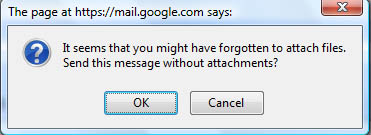
Gmail Labs Forgotten Attachment

There is one more new feature in Gmail, that is “mark as read” button, if you enable this feature you will see mark as read button beside delete button in gmail.

Gmail Mark as read button

Share this:

  • Tweet

Related

About Ram

I am a blogger and Technology Enthusiast. I write about software, tech news, gadgets. You can reach me at ram@teknobites.com, follow me on Google+ or on Twitter

« Download Google Chrome for Mac and Linux
VLC media player 0.9.2 released »

Comments

  1. Susan says

    I created a video about how to use this lab. Check it out! http://googleappsfan.blogspot.com/2009/01/new-gmail-lab-forgotten-attachment.html

Top Posts

  • Updated YouTube iOS App Adds Support for Live Streaming
  • Browser to Browser phone calls
  • Turn images to icons with Bradicon
  • Lenovo Smart Band HW01 with OLED display launched at Rs 1999
  • Convert Web Pages, Office Documents, PDFs to MP3 Files Online
  • Install Additional Language Packs in Windows Vista Home or Home Premium
  • Windows 7 RTM available from August 6 - family pack confirmed
  • LG Optimus L7 and Optimus 3D Max available in India
  • Google blocks non-Play Store Android Updates
  • How Search Engines treat No Follow link attribute

About Us · Archive · Disclaimer & Privacy Policy · TIP US · Copyright © 2026 · Technology Bites