Technology Bites

  • Home
  • Tech
    • Software
    • Browsers
    • Google
    • Internet
    • Windows
  • Mobile
    • Android
    • Apple
    • Windows Phone
  • Products
    • Phones
    • Tablets
  • TIP US
You are here: Home / Software / XPSysPad: Windows XP Launcher and Monitoring Utility

XPSysPad: Windows XP Launcher and Monitoring Utility

XPSysPad is a freeware that allows easy access to windows system information and windows system utilities such as control panel applets. It can also recover Windows 2000/XP & MS-Office product keys.

It can launch the hidden windows applications, launch any program with in a single click, search files, monitor running system processes and more. Overall it has some 250 functions. The program has menus to launch specific set of programs like control panel applets, network utilities, programs adn etc.
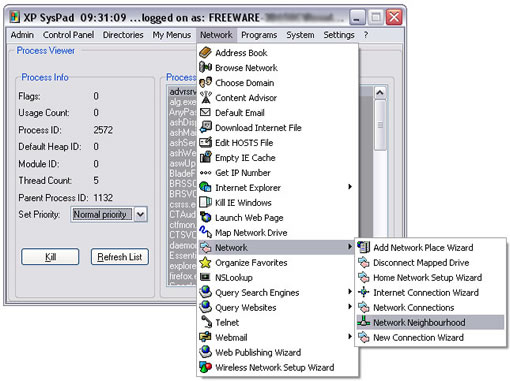
Xpsyspad

It is a tiny program, and can be minimzed to systray when not active. Compatible with Windows XP.

Download XPSysPad
Note: I don’t have XP system right now, so i haven’t tested this before posting.

Share this:

  • Tweet

Related

About Ram

I am a blogger and Technology Enthusiast. I write about software, tech news, gadgets. You can reach me at ram@teknobites.com, follow me on Google+ or on Twitter

« Visit Ancient Rome in 3D with Google Earth
Get Windows 7 Calculator for Windows Vista »

Top Posts

  • Fake Windows 8 - A Must Have Android App for Windows 8 Lovers
  • Facebook update brings Instagram, Tumblr, Pinterest and Flickr content to home screen
  • Accessibility Clickjacking Android Malware impacts 500 million Android devices
  • 20 Open Source Windows Apps For You
  • Updating.me Allows You to Update All Your Micro-Blogging Services
  • Yahoo new home page
  • Olive Telecom Launched Android based 3G tablet in India
  • HTC Android 4.0 update timeline
  • Samsung Galaxy Chat announced, Android 4.0, QWERTY Keyboard
  • Optimize Tool Box - The All-in-One Performance Utility for Android

About Us · Archive · Disclaimer & Privacy Policy · TIP US · Copyright © 2026 · Technology Bites