Technology Bites

  • Home
  • Tech
    • Software
    • Browsers
    • Google
    • Internet
    • Windows
  • Mobile
    • Android
    • Apple
    • Windows Phone
  • Products
    • Phones
    • Tablets
  • TIP US
You are here: Home / Tech News / WhatInStartup: Windows Startup Manager

WhatInStartup: Windows Startup Manager

What In Startup is a simple Windows startup manager that allows you to see, disable, enable or delete programs loaded during windows startup. The idea is to improve the startup time of the computer by removing or tweaking the stratup items.

If you have a bunch of programs loading at the windows startup they will have effect on boot load times, this program will help you in hunting the resource intensive programs so that you can disable them to load or remove unnecessary ones.

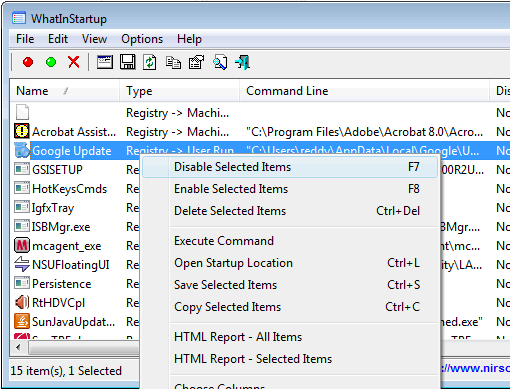
When you first run the application it will show you the list of programs running at the startup, for each program it shows startup type (Registry/Startup Folder), command line string, product name, file version, company name, location in the registry or file system. Right click on the program you want to modify its behavior and click the desired command.
whatinstartup

The app also gives reports as html items, you can select reports for all the items or for only selected items.

What In Startup supports a permanent disabling feature, that will make sure any application you disabled will be disabled later it it adds itself to the list.

WhatInStartup is a self executable app that works perfectly. It is a good app for optimizing your system startup. It with Windows 2000, XP, Vista and WIndows 7.

Also check out Disable Startup and Game Booster

Share this:

  • Tweet

Related

About Ram

I am a blogger and Technology Enthusiast. I write about software, tech news, gadgets. You can reach me at ram@teknobites.com, follow me on Google+ or on Twitter

« Test CSS Fonts Online with Font Tester
Recover Windows 7/XP/Vista and MS Office 2007 product keys »

Top Posts

  • Updated YouTube iOS App Adds Support for Live Streaming
  • Browser to Browser phone calls
  • Turn images to icons with Bradicon
  • Lenovo Smart Band HW01 with OLED display launched at Rs 1999
  • Convert Web Pages, Office Documents, PDFs to MP3 Files Online
  • Install Additional Language Packs in Windows Vista Home or Home Premium
  • Windows 7 RTM available from August 6 - family pack confirmed
  • LG Optimus L7 and Optimus 3D Max available in India
  • Google blocks non-Play Store Android Updates
  • How Search Engines treat No Follow link attribute

About Us · Archive · Disclaimer & Privacy Policy · TIP US · Copyright © 2026 · Technology Bites


Loading Comments...