Technology Bites

  • Home
  • Tech
    • Software
    • Browsers
    • Google
    • Internet
    • Windows
  • Mobile
    • Android
    • Apple
    • Windows Phone
  • Products
    • Phones
    • Tablets
  • TIP US
You are here: Home / Google / Upload and Share PDF Files with Google Docs

Upload and Share PDF Files with Google Docs

Now you can upload, preview and share PDF files using Google Docs. Editing of the PDF files is not yet there, but you can copy & paste text from them.

This is the most requested feature for Google Docs, PDF support will be liked by most of the Google Docs users as this is the popular format for sharing documents with others.

To upload a pdf click on upload and select PDF file from your computer or provide a web url to upload. Maximum file size you can upload is 10MB from your computer and 2MB from web.
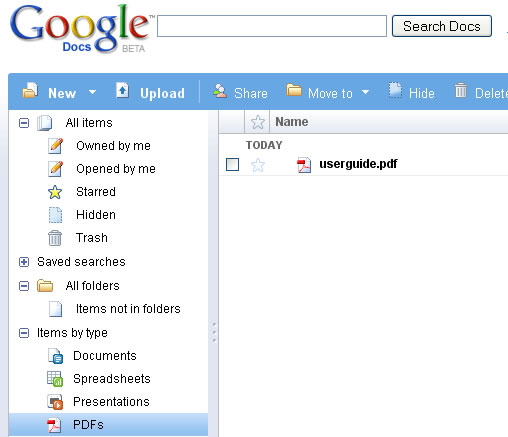
Google Docs PDF Support

Share this:

  • Tweet

Related

About Ram

I am a blogger and Technology Enthusiast. I write about software, tech news, gadgets. You can reach me at ram@teknobites.com, follow me on Google+ or on Twitter

« SugarSync: File Syncing Across Multiple Devices (3 Accounts Giveaway)
Firebug for Firefox 3 »

Top Posts

  • Download Windows Embedded theme for Windows XP and 2003
  • Download 10000 Free Shapes for Photoshop
  • Nested Twitter Replies Greasemonkey Script
  • Web 2.0 Background Generators
  • Convert Audio, Video and Image Files from One Format to Other
  • Split and Merge Large Files
  • Bing Maps Revamps Pushpins, Popups and Transit Info
  • Google kills iGoogle, Google Video, Google Mini and others
  • Crazy Fist 2 - A Game Similar To and Better Than Temple Run
  • Huawei Launches Ascend G510, Ascend Y300 Phones in India

About Us · Archive · Disclaimer & Privacy Policy · TIP US · Copyright © 2026 · Technology Bites