Technology Bites

  • Home
  • Tech
    • Software
    • Browsers
    • Google
    • Internet
    • Windows
  • Mobile
    • Android
    • Apple
    • Windows Phone
  • Products
    • Phones
    • Tablets
  • TIP US
You are here: Home / Google / Gmail “Never send it to spam”

Gmail “Never send it to spam”

Gmail has added a new filter rule “Never send it to spam”. Enabling this filter rule ensures your important email messages will never end up in Spam folder of gmail.
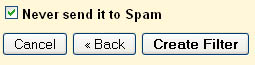
Gmail FiltersTo enable it go to Filters in settings and select the criteria first like From (teknobites.com) and then in the next step enable “never send it to spam”. This is a very useful filter for saving important messages sent to spam. via Google Blogoscoped

Share this:

  • Tweet

Related

About Ram

I am a blogger and Technology Enthusiast. I write about software, tech news, gadgets. You can reach me at ram@teknobites.com, follow me on Google+ or on Twitter

« Batch Resize Images with Fotosizer
Delicious Relaunched Today with Web 2.0ish Design »

Trackbacks

  1. Nuevo filtro de Gmail: "Nunca envies esto a Spam" | Geekets says:
    August 2, 2008 at 8:48 am

    […] Fuente: teknobites […]

Top Posts

  • Download Windows Embedded theme for Windows XP and 2003
  • Download 10000 Free Shapes for Photoshop
  • Nested Twitter Replies Greasemonkey Script
  • Web 2.0 Background Generators
  • Convert Audio, Video and Image Files from One Format to Other
  • Split and Merge Large Files
  • Bing Maps Revamps Pushpins, Popups and Transit Info
  • Google kills iGoogle, Google Video, Google Mini and others
  • Crazy Fist 2 - A Game Similar To and Better Than Temple Run
  • Huawei Launches Ascend G510, Ascend Y300 Phones in India

About Us · Archive · Disclaimer & Privacy Policy · TIP US · Copyright © 2026 · Technology Bites