Technology Bites

  • Home
  • Tech
    • Software
    • Browsers
    • Google
    • Internet
    • Windows
  • Mobile
    • Android
    • Apple
    • Windows Phone
  • Products
    • Phones
    • Tablets
  • TIP US
You are here: Home / Google / Gmail Labs: Forgotten attachment detector

Gmail Labs: Forgotten attachment detector

Gmail Labs team added another useful feature, forgotten attachment detector. This is an experimental feature, you need to enable this feature from Gmail Labs tab. Go to Settings, Labs tab and enable this feature to use it.

After enabling this feature if you mention an attachment in your email but forgot to attach a file, it will give you a popup message while sending with out attaching a file.
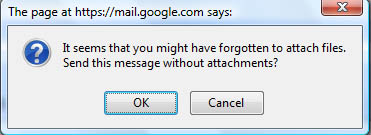
Gmail Labs Forgotten Attachment

There is one more new feature in Gmail, that is “mark as read” button, if you enable this feature you will see mark as read button beside delete button in gmail.

Gmail Mark as read button

Share this:

  • Tweet

Related

About Ram

I am a blogger and Technology Enthusiast. I write about software, tech news, gadgets. You can reach me at ram@teknobites.com, follow me on Google+ or on Twitter

« Download Google Chrome for Mac and Linux
VLC media player 0.9.2 released »

Comments

  1. Susan says

    I created a video about how to use this lab. Check it out! http://googleappsfan.blogspot.com/2009/01/new-gmail-lab-forgotten-attachment.html

Top Posts

  • Download 10000 Free Shapes for Photoshop
  • Download Windows Embedded theme for Windows XP and 2003
  • Nested Twitter Replies Greasemonkey Script
  • MyUninstaller: Alternative to windows Add/Remove Programs applet
  • Google Analytics Upgrade: Adsense integration, data visualization and more
  • Android 4.3 update for Sony Xperia Z and Xperia ZL leaked online
  • Google Chrome 18 brings GPU acceleration WebGL improvements
  • Sony Xperia SP Available for Pre-order at Rs. 25,490
  • Recover deleted files with Pandora Recovery
  • Catalogue movies, music, books, software.. anything with Data Crow

About Us · Archive · Disclaimer & Privacy Policy · TIP US · Copyright © 2026 · Technology Bites