Tumblr has added two-factor authentication to its service to improve the security. The two-factor authentication is optional for now, but it is advised to turn it on. By adding 2-factor authentication Tumblr joins a growing list of web services that have added this extra layer of security in the wake of high profile hacks like Adobe hack where hackers released user data to the public. Everyday use services like Twitter, Dropbox, Evernote and Google, all added the 2-factor authentication and Tumblr joins that growing list of services.
Some services added this option after getting hacked, but Tumblr doesn’t want that to happen so it turned on the security feature. Tumblr users can enable the two-factor authentication from account settings. Two-factor authentication is also called as two-step verification. “You know how you need two keys to launch a nuclear missile? Two-factor authentication works like that. One key is your password, the other key is your cellular phone, and you need both to access your Tumblr Dashboard.” Tumblr wrote on a blog post.
Enable Two-Factor Authentication on Tumblr
Go to account settings page. Enable the checkbox for Two-factor authentication
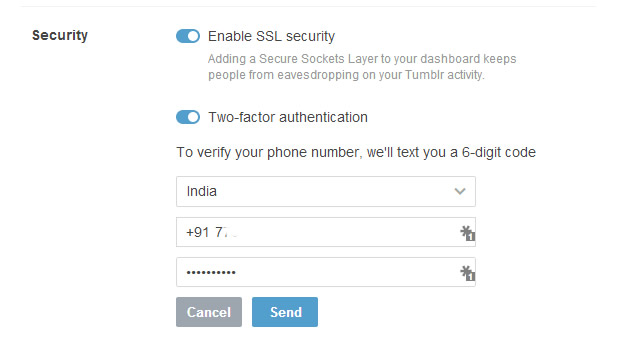
Select your country and enter your phone number. You will receive a 6-digit code to verify your phone number.
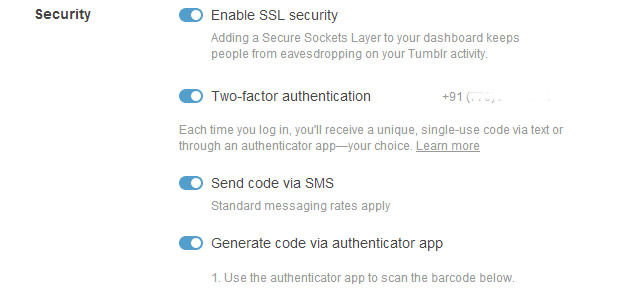
After verifying he phone you can select how you want to enable 2-factor authentication. You can opt for text codes via SMS or use an app like Google Authenticator app. Tumblr recommends using both as the other one serves as a backup in case you lose your phone.
Once you are done with the process, remember to generate a one time password for logging in to Tumblr mobile apps on iOS and Android devices. Happy Tumbling.

