SE-Explorer is yet another windows explorer alternative with some nifty features. The app is available as both portable and installer editions. SE-Explorer has dual-pane with tabbed interface for working two directories at the same time.
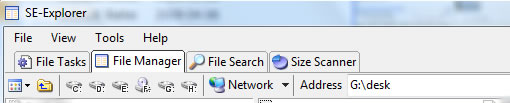
SE-Explorer by default has 4 tabs, file manager, file search, file tasks and size scanner. File Manager has dual-pane interface for working with files simultaneously. File manager shows shortcuts for all the disk drives and network on the toolbar itself. You can open folders and files as you do normally on windows explorer. You can also open files with default windows explorer from SE-Explorer by right-clicking and selecting the view menu.
For Audio and Video Files it has an in-built media player which comes with the archive. You can use that for playing media files, it will open it in a new tab on the same window.
Features:
- Clear tabbed interface
- Different file browsers: dual panel, classic windows explorer, command prompt
- Enhanced file search function and embedded size scanner
- Media player for audio and video files: MP3, WAV, AVI, MPEG, WMV, SWF, MOV, etc.
- Picture viewer which supports most popular image file formats
- Archive explorer for ZIP, RAR, ISO, 7Z, MSI, CAB, etc.
- Resource view for executable files and icon libraries
- PDF, DjVu, Html Help and RTF document view
- Text viewer with syntax highlighting
- Hex viewer for binary files
- Browser window for local web and email files
- TTF Font files view
- XML structure view
Se-Explorer is a freeware for windows and works with Win 2000/XP/2003/Vista. Related Windows Explorer alternatives include Q-Dir and Xplorer2lite

